
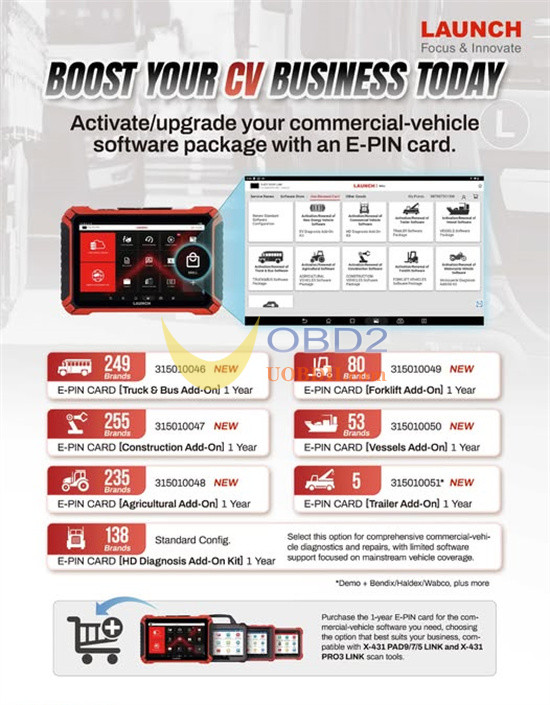
If your Launch Heavy Duty annual subscription has expired (after the initial 1 or 2 years of free updates), you can purchase Launch E-PIN Card 1 Year Renewals to extend your update coverage for an additional year.
Important Notes:
1.Verification Required:
Before purchasing, please provide your device serial number so we can confirm service eligibility. Devices purchased through overseas dealers may not be eligible for update services from us.
2.Service Term:
This is a 1-Year Update Service.
3.Convenient Process:
The service is performed entirely online. No shipping is required.
4.Compatibility:
This renewal is suitable for:
- B-BOX PAD Series
- X-431 SmartLink C HD V2.0 Expanded Commercial Vehicles Software Update Subscription
5.Processing Time:
Launch technicians typically complete the update setup within 1-2 business days.
Compatible Device Series:
1): X431 Pro 10-inch Series with DBSCar 7 as VCI:
2): With B-BOX HD module PAD/PRO Series:
- LAUNCH X431 PRO3 V+ 5.0 Elite
- LAUNCH X431 PRO3S+ Elite
- Launch X431 Pro5 Smartlink
- Launch X431 PAD V Elite
- Launch X431 PAD VII Elite
How to Obtain the Heavy-Duty Truck Software License?
1.Place your order on our website and complete checkout.
2.Provide your device serial number to us.
3.We will activate a one-year update authorization for your device.
4.Launch technician will enable the update service remotely (no physical shipment required).
5.We will email you a Subscription Renewal Card containing your unique Card Number and Password.
How to Activate Your Launch X431 Heavy Duty Renewal Card?
1.Open the Launch application from your device’s home screen.
2.Tap “Login” in the upper right corner to access the system. (Ensure your device is connected to a stable Wi-Fi network.)
3.Navigate to “Update” to enter the update center.
4.Tap the “Renewal” button on the update page to activate your card. (Note: The “Renewal” option only appears after your current subscription has expired.)
5.Enter the 24-digit password from your Subscription Renewal Card and tap “Confirm” to complete the activation. You can view your order details under “Profile” → “My Order”.
